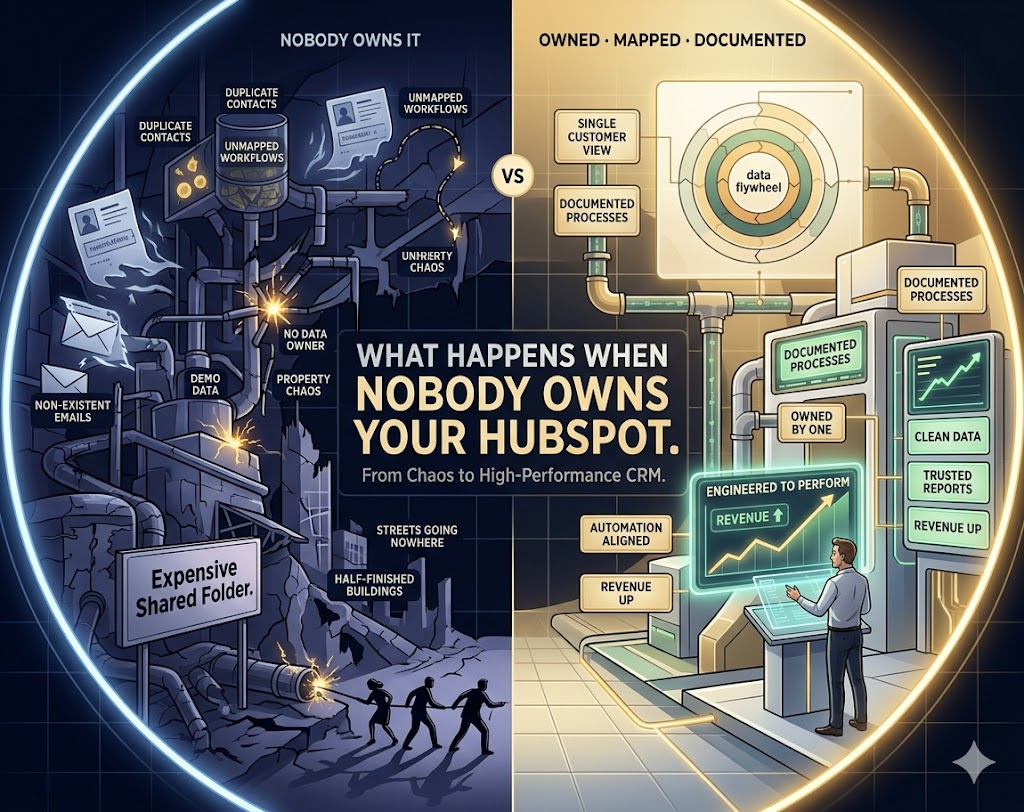
I've walked into a lot of HubSpot portals over the years. Some are tight, well-documented, clearly owned. But most? Most look like a city that was built without a planning department. Streets going nowhere. Buildings half-finished. Nobody quite sure why that road was put there in the first place.
The one I walked into at a large enterprise organisation — under NDA, so I'll call them Organisation X — was, genuinely, one of the most chaotic I've seen. And the painful part? It wasn't anyone's fault. It was a completely predictable outcome of a completely avoidable decision: launching HubSpot without an experienced platform owner.
What I found when I got in there, and what I've seen repeated across dozens of organisations, is the pattern I want to talk about today.
Nobody owns it — and that changes everything
Here's the thing about HubSpot: it's impressively easy to get started in. Any reasonably technical person can log in, build a workflow, import a list, fire off an email sequence. The barrier to entry is low by design.
That's also exactly why things go wrong so fast.
When there's no designated platform owner — someone who understands the architecture, enforces naming conventions, governs who touches what, and documents decisions — you end up with something that looks like HubSpot on the surface but functions like chaos underneath. Every department does what makes sense to them right now. Nobody sees the full picture. Nobody's responsible for the health of the whole.
A HubSpot portal without an owner isn't a CRM. It's an expensive shared folder where marketing, sales, and events all store their work in different formats and argue about which folder the client goes in.
What I actually found
I'm not going to name the organisation — there's an NDA in place. But I will tell you what I walked into, because it's a story I've seen in different forms across SaaS companies, ecommerce brands, agencies, and enterprise. The patterns are remarkably consistent.
When I opened the portal for the first time, here's what greeted me:
- Multiple departments had been using the platform independently — events, trade, marketing, partnerships — each treating it like their own private tool
- Contact records were drowning in duplicates: the same person imported six times by six different teams with six different property values, none of them matching
- Workflows built during demos that were never completed, never deleted, still sitting there with active status, firing on contacts nobody intended them to touch
- Template emails sitting in draft with placeholder text — "[CLIENT NAME]", "[INSERT OFFER]" — that had never been finished
- Lifecycle stages assigned randomly — MQLs mixed with Customers mixed with Subscribers — with no logic connecting them to actual sales stages
- Properties duplicated under different names: "Industry" and "Client Industry" and "Sector" all existing simultaneously, all incomplete, none of them consistent
- Zero knowledge base. No documentation. No naming conventions. No onboarding guide for new team members.
The result was a platform that technically worked — automations fired, emails sent, records existed — but nobody could trust any of the data coming out of it. Reports were unreliable. Segments were wrong. Sales were working from contact lists that had been last cleaned nobody-knows-when.
And the thing that made me most frustrated? Every single team had done their best with what they had. They weren't careless. They were just unguided.
The real cost isn't the subscription fee
Organisations think about HubSpot costs in terms of their monthly licence. That's the visible number. But the invisible cost — the one that doesn't show up on any invoice — is what bad data and broken workflows actually cost you in wasted effort, missed opportunities, and decisions made on false information.
When a marketing team can't trust their segment lists, they either over-communicate (annoying contacts, burning your sender reputation) or under-communicate (missing the people who actually want to hear from you). Both cost revenue. Both are invisible on the dashboard.
When a sales team can't trust the lifecycle stage data, they don't use the CRM for pipeline management. They go back to spreadsheets. You've paid for HubSpot and you're still running the business on Excel.
The 5 patterns I always find in broken portals
After enough audits, you start seeing the same things. These aren't random failures — they're structural. They happen because nobody made intentional decisions early, so the platform filled in the gaps with whatever each team thought made sense at the time.
1. No lifecycle stage logic. Contacts get assigned stages based on how they came in, not where they actually are in a buyer journey. Leads from a webinar sit as "Subscriber." Customers from two years ago are still marked "Lead." The data becomes meaningless.
2. Workflow sprawl. There are more workflows than anyone can count, built by people who've since left the company, touching contacts for reasons no current employee can explain. Active workflows sending emails to lists that no longer exist. Triggers firing on conditions that were set up for a campaign three years ago and never turned off.
3. Property chaos. Every time someone needs to capture a new piece of data, they create a new property instead of checking if one already exists. Multiply this by a few years and a few teams and you end up with hundreds of properties, most of them empty, many of them duplicates of each other under slightly different names.
4. Demo data contamination. HubSpot comes with sample contacts, sample deals, and sample data to help new users explore. I cannot count the number of portals I've seen where this demo data was never removed — where real contacts live alongside fictional ones and nobody's sure which is which.
5. No documentation, no KB, no onboarding guide. When the person who built something leaves, the knowledge leaves with them. The next person inherits a portal full of decisions they didn't make and can't explain. They do what they can — add more workflows, import more contacts — and make everything worse without meaning to.
How to actually fix it
The fix isn't dramatic. It doesn't require ripping everything out and starting over — though sometimes the temptation is real. It requires something much more boring: systematic triage, clear governance, and documentation.
Here's roughly how I approach a broken portal:
Step 1: Freeze first, clean second. Before touching anything, map what exists. Don't delete workflows you don't understand — pause them and document what they do. Deleting before you understand is how you break things that were quietly working.
Step 2: Audit and segment the contact database. Find duplicates, identify contacts with critical missing data, and build a suppression list of contacts who should never receive communications. Clean the data before you trust the data.
Step 3: Define your lifecycle stages — once, clearly. Get every stakeholder in a room (or a call), agree on exactly what each stage means, and build the automation logic to maintain them. Write it down. Put it somewhere everyone can find it.
Step 4: Build a governance doc. Naming conventions for workflows, properties, lists, and campaigns. Who can create what. How to request a new workflow. This doesn't need to be elaborate — a shared Google Doc with a table of contents does the job. The point is it exists.
Step 5: Assign ownership. One person. The person who gets paged when something breaks, who reviews new workflows before they go live, who is accountable for the health of the portal. Without a named owner, everything drifts back toward chaos. It's entropy — it always is.
What a well-owned HubSpot actually looks like
When a portal is working properly, you feel it before you see it. Reporting is reliable enough that marketing decisions get made from it rather than from gut feel. Sales knows which leads are warm without having to ask. Automations fire on the right people at the right time without anyone watching over them.
There's a knowledge base that tells new team members what each workflow does and why. There are naming conventions that make it obvious at a glance whether a contact is a client, a prospect, or an event attendee. There's an owner who spots drift early and corrects it before it compounds.
That's what HubSpot is supposed to be. Not a dumping ground for everyone's separate attempts at CRM — a single, reliable, well-maintained engine for the business.
The gap between where most organisations are and where they could be isn't technology. It's ownership, governance, and the willingness to spend time building the foundation correctly instead of rushing to build on sand.
If your portal is starting to feel like the one I described at the top — if people are losing trust in the data, if workflows exist that nobody understands, if every new campaign requires a manual export because the segments can't be trusted — it's not a HubSpot problem. It's a fixable one.

I've audited and rebuilt HubSpot portals across SaaS, ecommerce, agencies, and enterprise organisations. Currently embedded as Marketing Automation Specialist at a major NZ trade organisation. If your portal is a mess, I know exactly what to do about it.
Is your HubSpot portal working for you — or against you?
A broken portal isn't just a tech problem — it's a revenue problem. I audit, rebuild, and document HubSpot portals for organisations who need to trust their CRM again. Fixed fee, clear timeline, 30-day post-delivery support.